 System Features
Dell™ PowerEdge™ 2550 Systems User's Guide
Preventing Unauthorized Access to the System
Safety, Regulatory, and Warranty Information
The Dell™ PowerEdge™ 2550 system, which has single or double Intel® Pentium® III microprocessors, is an ultra-slimline, full-featured, rack-mounted server. The PowerEdge 2550 provides a robust, reliable, rack-optimized platform on which both large and small customers can deploy their mission-critical applications.
This chapter describes the system's major hardware and software features, provides information about the indicators and controls on the system's front panel, and discusses connecting external devices.
PowerEdge 2550 systems offer the following major features:
The Processor Speed option on Page 1 of the System Setup program lists your system's processor speed. For more information, see "Using the System Setup Program."
The Pentium III microprocessor includes MMX™ technology designed to handle complex multimedia and communications software. This microprocessor incorporates new instructions and data types as well as a technique called single instruction, multiple data (SIMD) that allows the microprocessor to process multiple data elements in parallel, thereby improving overall system performance.
A secondary level 2 (L2) cache of static random-access memory (SRAM) is included within the microprocessor. Math coprocessor functions are provided by the microprocessor. A separate and external math coprocessor chip is not used or required.
The size of the L2 cache is dependent on the processor installed in the system. The first screen of the System Setup program lists the system's cache size. For more information, see "Using the System Setup Program."
 |
NOTE: Support for symmetric multiprocessing is available by installing a second Pentium III microprocessor. Symmetric multiprocessing greatly improves overall system performance by dividing microprocessor operations between the two independent microprocessors. To take advantage of this feature, you must use an operating system that supports multiprocessing, such as Microsoft® Windows NT® Server 4.0 or Novell® NetWare® 4.2 (and later versions). |
|
NOTE: If you decide to upgrade your system by installing a second microprocessor, you must order a microprocessor upgrade kit from Dell. Not all versions of the Pentium III microprocessor work properly as a second microprocessor. The upgrade kit contains the correct version of the micro-processor for use as a second microprocessor as well as instructions for performing the upgrade. |
The system board includes the following integrated features:
The parallel port can be set to operate in the following modes via the Parallel Mode option in the System Setup program: output-only (AT-compatible), bidirectional (Personal System/2 [PS/2]-compatible).
Standard PowerEdge 2550 systems include a combined 3.5-inch diskette drive and an IDE CD-ROM drive installed in an externally accessible bay and a SCSI hard-disk drive installed in slot 0.
The following software is included in your PowerEdge system:
Dell supports the following network operating systems for use on PowerEdge 2550 systems:
|
NOTE: Installation service and support for other operating systems are available through Dell Plus. For more information, see "Getting Help" in your Installation and Troubleshooting Guide. |
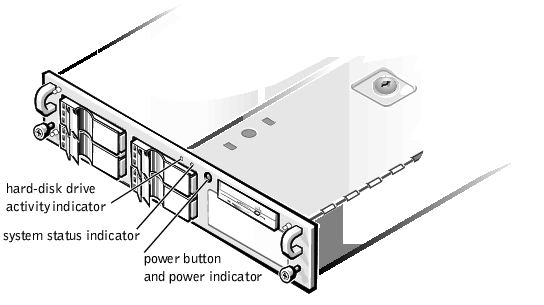
Figure 1-1 shows the controls and indicators located behind the bezel on the system's front panel.
Figure 1-1. Front-Panel Features
You can connect various external devices, such as a mouse and printer, to the I/O ports and connectors on the system's back panel (see Figure 1-2).
Figure 1-2. Back-Panel Features
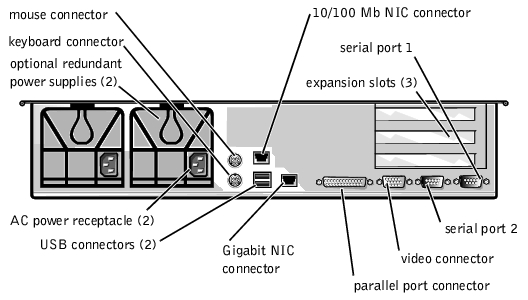
The system BIOS detects the presence of external devices when you boot or reboot your system. When you connect external devices to your system, follow these guidelines:
For example, most devices must be connected to a particular I/O port or connector to operate properly. Also, external devices such as a mouse or printer usually require that you load software files called device drivers into memory before they will work. These software drivers help the system recognize an external device and direct its operation. Device drivers of this type are normally included with your operating system software.
For information about enabling, disabling, or configuring I/O ports and connectors, see "Using the System Setup Program" or "Installing SCSI Hard-Disk Drives." For detailed descriptions and illustrations of each port and connector on the I/O panel, see "I/O Ports and Connectors."
A keylock on the top of the system prevents unauthorized access to the system.
PowerEdge 2550 systems also include a system intrusion switch that signals the appropriate server management software if the system doors are opened.
See your System Information document for important safety, regulatory, and warranty information for your system.
If at any time you do not understand a procedure described in this guide, or if your system does not perform as expected, Dell provides a number of tools to help you. For more information on these help tools, see "Getting Help" in your Installation and Troubleshooting Guide.