 Removing the Keyboard
Dell™ Latitude™ D610 Service Manual

|
CAUTION: Before you begin any of the procedures in this section, follow the safety instructions in the Product Information Guide. |

|
NOTICE: To avoid electrostatic discharge, ground yourself by using a wrist grounding strap or by periodically touching an unpainted metal surface (such as the back panel) on the computer. |
|
|
NOTICE: When you remove the keyboard, pull up gently to avoid damaging the keyboard cable. |
|
|
NOTICE: The keycaps on the keyboard are fragile, easily dislodged, and time-consuming to replace. Be careful when removing and handling the keyboard. |

|
NOTE: When you replace the keyboard, ensure that the keyboard tabs are completely in place to avoid scratching the palm rest. |
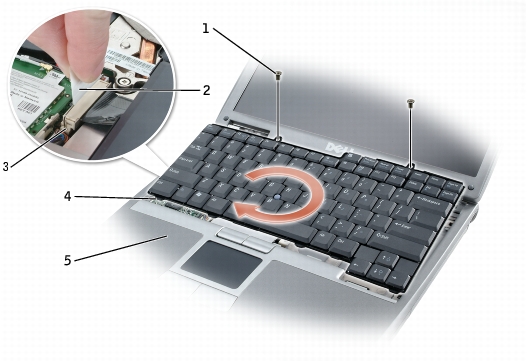
1 M2.5 x 5-mm screws (2) 2 keyboard cable pull-tab 3 keyboard connector on system board 4 keyboard tabs (5) 5 palm rest
|
|
NOTE: You may need to slightly push the keyboard tabs into the base of the computer. |