|
Inside the Computer: Dell OptiPlex GX50 Systems
Back to Contents Page
Dell™ OptiPlex™ GX50 Systems
 Key Components Key Components
Computer Cables
Inside the Small Form-Factor Computer
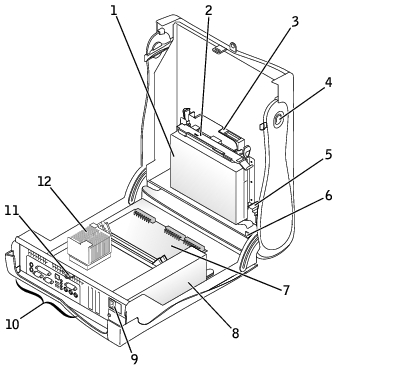
1 | Hard drive | 7 | System board |
2 | 3.5-inch floppy drive | 8 | Power supply |
3 | CD drive | 9 | AC power connector |
4 | Cover release buttons (2) | 10 | I/O ports and connectors |
5 | Internal speaker | 11 | Padlock ring |
6 | Chassis intrusion switch | 12 | Heat sink assembly |
Inside the Small Desktop Computer
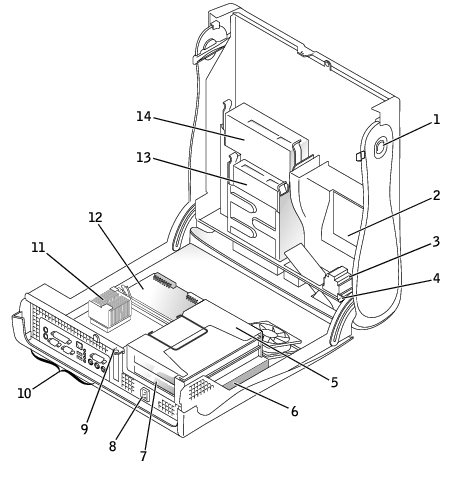
1 | Cover release buttons (2) | 8 | AC power connector |
2 | Hard drive | 9 | Padlock ring |
3 | Internal speaker | 10 | I/O ports and connectors |
4 | Chassis intrusion switch | 11 | Heat sink assembly |
5 | Expansion-card cage | 12 | System board |
6 | Power supply | 13 | 3.5-inch floppy drive |
7 | Expansion-card slots | 14 | CD drive |
Inside the Small Mini-Tower Computer
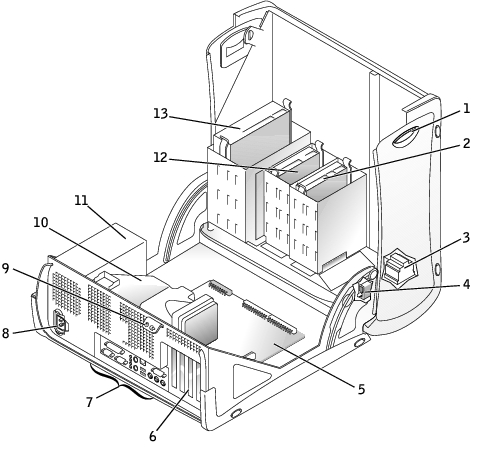
1 | Cover release buttons (2) | 8 | AC power connector |
2 | Hard drive | 9 | Padlock ring |
3 | Internal speaker | 10 | Microprocessor and airflow shroud |
4 | Chassis intrusion switch | 11 | Power supply |
5 | System board | 12 | 3.5-inch floppy drive |
6 | Expansion-card slots | 13 | CD drive |
7 | I/O ports and connectors | | |
Small Form-Factor Computer
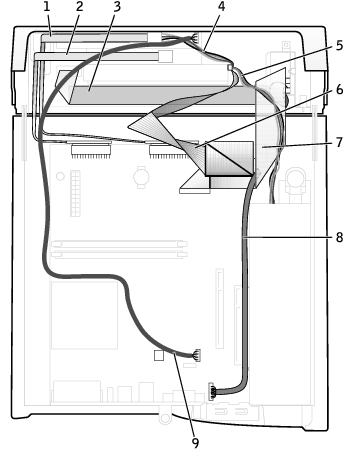
1 | CD drive data cable | 6 | IDE data cable (hard drive) |
2 | Floppy drive data cable | 7 | Input/output cable |
3 | Control panel cable | 8 | Input/output audio cable |
4 | CD drive power cable | 9 | CD audio cable |
5 | IDE drive power cable (hard drive) | | |
Small Desktop Computer
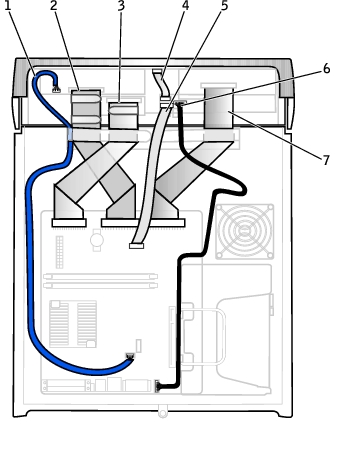
1 | CD drive audio cable | 5 | Front I/O cable |
2 | CD drive data cable | 6 | Front I/O audio cable |
3 | 3.5-inch floppy drive data cable | 7 | EIDE interface cable (hard drive) |
4 | Control panel cable | | |
Small Mini-Tower Computer
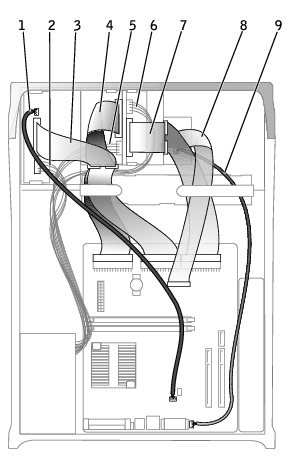
1 | CD drive audio cable | 6 | Hard drive power cable |
2 | CD drive power cable | 7 | Hard drive data cable |
3 | CD drive data cable | 8 | Front I/O cable |
4 | Floppy drive data cable | 9 | Front I/O audio cable |
5 | Floppy drive power cable | | |
Cable Colors
Hard drive | Blue pull tab |
Floppy drive | Black pull tab |
CD drive | Orange pull tab |
ATA or IDE | Gray |
Control panel | Gray |
CD audio | Blue |
Computer audio | Black |
Back to Contents Page
| 

